Marketplace alert guide
Swoopa pricing: is it worth it?
Swoopa’s monthly plans were listed at $47 for Go, $144 for Turbo and $352 for Nitro when we checked on September 22, 2026. Lower advertised monthly equivalents require a 6- or 12-month commitment. Whether that cost is worthwhile depends on the searches and sourcing features you use. This assessment is published by JDMarket; we have not tested Swoopa’s paid features side by side.
What Swoopa costs
Prices checked September 22, 2026, in USD before tax: monthly Go was $47, Turbo $144 and Nitro $352. Committed options were Go at $28/month ($336 for 12 months), Turbo at $99/month ($594 for 6 months) and Nitro at $199/month ($1,194 for 6 months). Compare the total billing commitment, then confirm the current price and renewal terms at checkout.
When Swoopa can be worth the subscription
Start with the features you will actually use. Swoopa may fit a sourcing operation that needs its advertised marketplace coverage and higher-tier tools such as price-drop alerts or VIN-related features. If you only need one occasional saved search, begin with a free option. If you need a small number of scheduled searches, compare a per-watch subscription before buying a larger bundle. We have not measured which service finds listings first.
Where Swoopa may fit
Its published plans include AI evaluation and scam filtering, with broader marketplace coverage and additional sourcing features on higher tiers. Test whether those extras save you time. We have not tested its accuracy or established that one tool reliably reaches every listing first.
Where JDMarket may fit
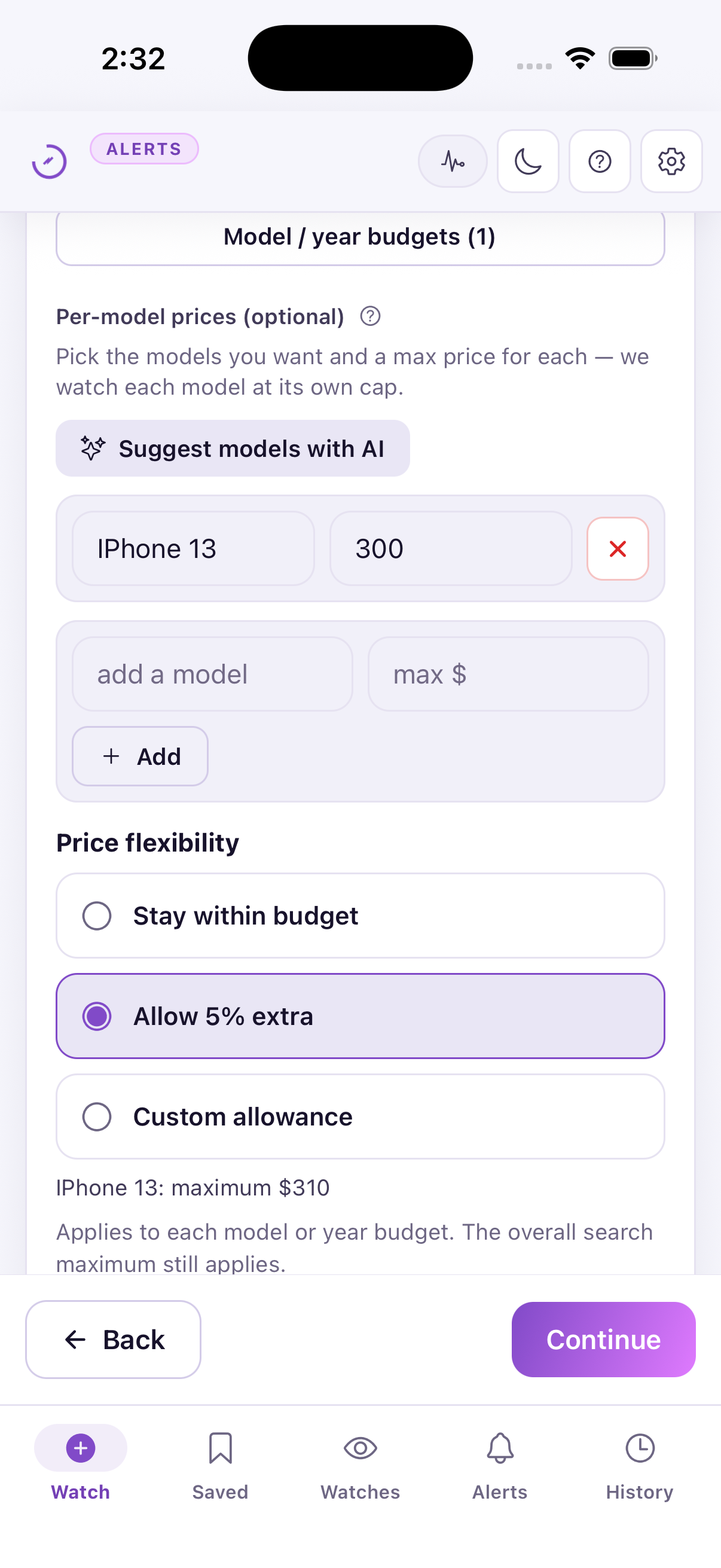
JDMarket includes 10 watches per plan and separate controls for model budgets, price flexibility and missing listing details. In our September 22 setup check, a $300 iPhone 13 budget with 5% flexibility displayed $315, then correctly stayed at $310 after we lowered the overall cap. These settings and the strict requirements option survived saving and reopening. This demonstrates configuration, not competitor superiority or listing-classification accuracy.
How to evaluate a trial
Use the same item, radius and budget in each tool. Record when a listing is first visible to you, when each notification arrives, whether it meets your rules and whether it was still available. Include missed listings and false matches. Do not count demo notifications or an initial backfill as speed measurements.
What we tested and what remains unmeasured
Published by JDMarket, a product included here. Public competitor plans were rechecked on September 22, 2026. Our hands-on evidence covers JDMarket budget controls and saving a watch; competitor performance has not been tested side by side. Store offers, billing commitments and regional availability can differ. The documented simulator example uses an existing JDMarket 1.5.2 build connected to our service. We did not measure delivery to a physical phone, test Swoopa’s paid features, or conduct a customer-review survey. Our recommendation is conditional on your workflow, not a claim of an independently tested winner. Create your account and subscribe in the JDMarket app. Prices, renewal terms and any available offers are shown by the App Store or Google Play before purchase.
Monthly equivalent is not the amount you commit to pay
The committed Nitro option is $1,194 for six months. Three separate monthly payments at $352 total $1,056; four total $1,408. The lower monthly equivalent therefore becomes cheaper only if you need more than three months at these prices. Go has the same tradeoff: seven monthly payments total $329, while the 12-month commitment is $336. These calculations compare the stated subscription amounts, not refunds, tax, promotions or equivalent capacity. Check checkout terms before committing.
| JDMarket | Swoopa | |
|---|---|---|
| Monthly web price | Basic $30; Pro $45; Premium $80 | Go $47; Turbo $144; Nitro $352 |
| Longer billing commitment | Annual Basic $252; Pro $378; Premium $672 | Go $336/12 months; Turbo $594/6 months; Nitro $1,194/6 months |
| Timing | Basic: 2 watches scheduled every 5 minutes and 8 every 10 minutes. Pro: 2 every minute and 8 every 5 minutes. Premium: all 10 every minute. | Go: basic; Turbo: fast; Nitro: instant (vendor descriptions, not our measurements) |
| AI features | Natural-language rules and 1–5 match scoring | Advertises AI evaluator and scam filtering; more AI tools on higher tiers |
| Trial | Create your account and subscribe in the JDMarket app. Prices, renewal terms and any available offers are shown by the App Store or Google Play before purchase. | Advertises 7 days; check checkout conditions |
Published by JDMarket, a product included here. Public competitor plans were rechecked on September 22, 2026. Our hands-on evidence covers JDMarket budget controls and saving a watch; competitor performance has not been tested side by side. Store offers, billing commitments and regional availability can differ. Create your account and subscribe in the JDMarket app. Prices, renewal terms and any available offers are shown by the App Store or Google Play before purchase.
| Scenario | Separate monthly payments | Committed plan amount |
|---|---|---|
| Go for 1 month | $47 | $336 for 12 months |
| Go for 7 months | $329 | $336 for 12 months |
| Go for 12 months | $564 | $336 for 12 months |
| Nitro for 3 months | $1,056 | $1,194 for 6 months |
| Nitro for 4 months | $1,408 | $1,194 for 6 months |
| Nitro for 6 months | $2,112 | $1,194 for 6 months |
Arithmetic: months × $47 for Go or × $352 for Nitro. The committed column is the advertised full billing commitment, not a prorated cost for the shorter scenario. Committed plans may include different capacity; this is a cost comparison, not equal service or a recommendation to choose an annual contract.
Keep your own comparison log
Use the same marketplace, item, area, currency and required details in each tool. Record complete observation periods and every reference listing you check, including ones with no alert. Keep existing inventory and test notifications separate from new-listing alerts.
Use UTC timestamps with a timezone, such as 2026-09-22T14:05:00Z. Leave an unknown time blank. Your first observation is not the seller’s publication time; the difference between your observation and an alert is not proof of total delivery speed. Compare useful matches, missing alerts and false matches before drawing conclusions.
Download the blank comparison log (CSV)Opens in Excel, Numbers or Google Sheets. No sample results or measured performance are prefilled.
Sources & verification
- Swoopa — subscription options — Published monthly and committed plan prices, billing periods, trial and AI features. Vendor claims, not independently measured performance. (Verified 2026-09-22)
- Flipify — official site — Published per-watchlist prices, check schedules, trial conditions and AI-assisted filtering. (Verified 2026-09-22)
Questions
Is Swoopa Nitro only available at $352 per month?
No. The published monthly option is $352, and the committed option is $199 per month with $1,194 billed for six months. Verify the selected terms at checkout.
Is JDMarket faster than Swoopa?
We have not established that with a controlled test. JDMarket publishes scheduled check intervals; Swoopa uses plan-specific speed descriptions. End-to-end delivery also depends on the marketplace.