Step-by-step setup guide
How to set up Facebook Marketplace alerts
Start with Facebook’s free notification controls. A saved item is one listing you want to revisit; a saved search is a set of criteria for future listings. Facebook’s controls vary by account and app version, so use the steps that match the interface you see.
1. Create a useful Marketplace search
Open Marketplace and search for a specific item. Set the location, category and price range before saving. If your results show a Save search, Notify me or alert control, open it, check the criteria and confirm. Do not confuse the Save button on an individual listing with a search alert. If no search-alert option appears, continue to the notification settings and troubleshooting below.
2. Enable saved-search notifications in the Facebook app
Facebook’s current iPhone and Android Help pages use the same notification path. The position and appearance of the menu can vary.
- Open Facebook’s menu and choose Marketplace; use See more if it is not shown.
- Open your Marketplace profile, then Settings and Notifications.
- Open the Saved searches category where it is available and turn on the notifications you want. A blue switch is on; a grey switch is off.
3. Check Facebook notification settings on a computer
These settings control which Marketplace notifications Facebook may send; they do not promise an alert for every matching listing.
- Open your Facebook profile menu, then Settings & privacy and Settings.
- Choose Notifications, then Marketplace.
- Enable the relevant notification types. If you expect browser banners, also allow Facebook notifications in the browser’s site permissions.
4. Allow notifications on your phone
On iPhone, open Settings → Notifications → Facebook and turn on Allow Notifications. Check Focus and Scheduled Summary if banners are delayed. On Android, open Settings → Notifications → App notifications → Facebook, then enable the relevant categories. Android menus vary by manufacturer; check silent categories and Do Not Disturb as well.
5. If Save search or notifications are missing
Confirm that you are using the intended account and can open Marketplace. Update the app and compare its controls with the desktop site. Check whether you saved an item rather than a search. Reopen a broad, realistic search to see whether new matching listings exist. If a control is not available to your account, there is no universal button sequence that can enable it. Use Facebook Help to report a problem, or revisit a bookmarked search manually.
6. Optional: create a JDMarket watch
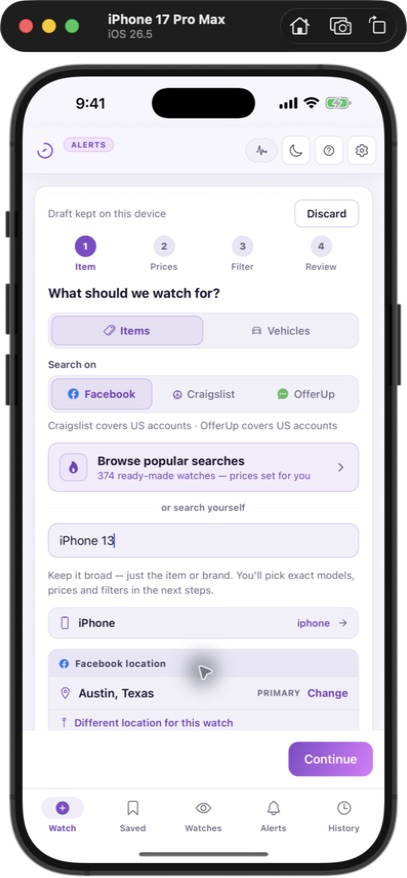
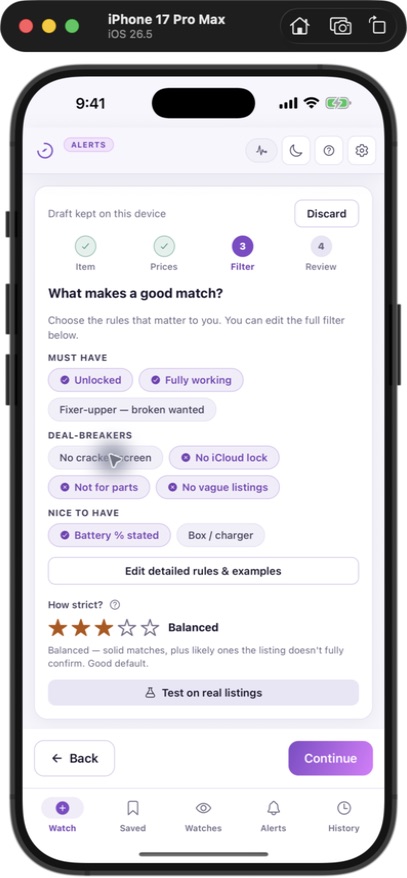
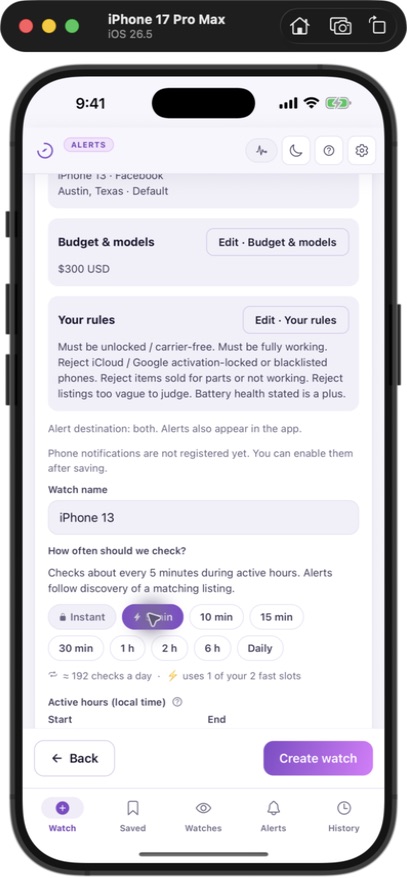
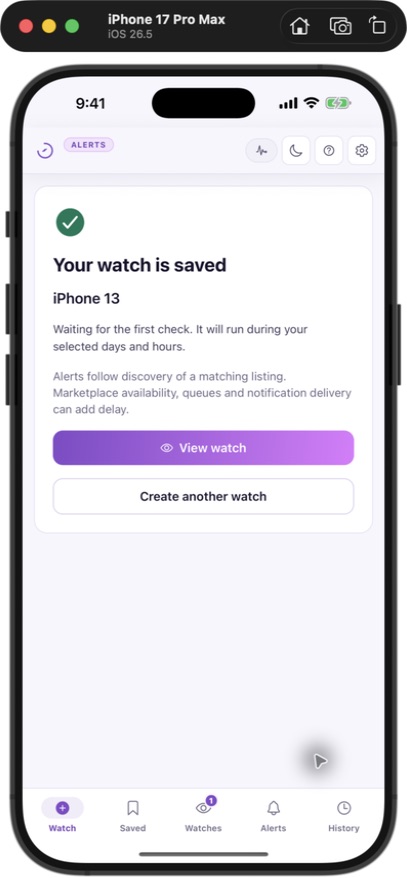
For scheduled checks and separate push or Telegram delivery, create a JDMarket account, confirm your email and select a plan. Web Basic starts at $30/month with a card-required 3-day trial that renews unless cancelled; Pro and Premium have no web trial. The screenshots below document our test-account setup, not a customer purchase or a speed benchmark.
- Choose a marketplace available for your account country and set your search location.
- Choose the item or vehicle, budget and useful conditions. Use plain-language rules to describe which listings fit.
- Review the marketplace, location, rules and schedule before saving.
- Enable the app’s notifications or connect Telegram, then review your watch and any matching results.
7. Check whether the setup works
Keep a short record of the search, device, date and settings. When a real matching listing becomes visible, check whether an alert appears in the app and on the chosen channel. A quiet search may simply have no new matches. Compare your criteria with the original listing before making them stricter. Every JDMarket plan includes 10 watches. Basic ($30/month) schedules 2 every 5 minutes and 8 every 10 minutes; Pro ($45/month) schedules 2 every minute and 8 every 5 minutes; Premium ($80/month) schedules all 10 every minute. Listing visibility, filtering, retries, daily check limits and notification delivery can add delay.
Sources & verification
- Facebook Help — Marketplace notification controls — Official iPhone, Android and computer instructions checked in Facebook Help. Menu placement and available categories can vary. (Verified 2026-09-10)
- Apple Support — iPhone notification settings — Allow notifications per app and choose how they appear on iPhone. (Verified 2026-09-10)
- Android Help — notification controls — Per-app notification permissions and categories; menu names can vary by device. (Verified 2026-09-10)