Find the listings you care about. Let your searches run.
JDMarket monitors Facebook Marketplace, Craigslist, OfferUp, Kijiji and Gumtree, applies your filters, and sends matching listings to Telegram and your phone. Marketplace availability depends on your country.
Now on iPhone and Android — sign up free, then download it from the App Store or Google Play.
Alerts
Keep track of matching listings
JDMarket checks your searches on your plan’s schedule and sends matches after filtering. Review the listing and contact the seller when it fits what you need.
- Scheduled alerts, 24/7
- iPhone & Android push + Telegram
- Runs in the cloud — devices off
- Sent-alerts inbox keeps the history
Listing posted
2017 Honda Civic EX · $7,900
JDMarket pings you
25% under market · AI 5/5
You message the seller — first
Deal booked
14 more buyers ask — too late
AI filters
Smart filters. Cleaner results.
Every match is scored 1–5 by AI against your exact criteria — model, year, condition, price. Spam, parts-only posts and re-bumped ads are dropped before they ever reach your phone.
- AI scores every listing 1–5
- Filters written in plain language
- Make & model gate for cars
- Re-bumped ads filtered out
Everything JDMarket watches for you
Set a watch once — the cloud does the rest.
Push + Telegram alerts
Your phone buzzes the moment we spot a match — push on iPhone and Android, or Telegram, your call.
AI match scoring
Every listing is scored 1–5 against your criteria before it reaches you.
5 marketplaces, one app
Facebook Marketplace everywhere, plus Craigslist and OfferUp in the US, Kijiji in Canada and Gumtree in the UK.
Price bands per model
One watch, many models and years — each with its own price cap.
Car-buyer filters
Year, mileage, title status and more — applied by AI to every car listing.
Runs 24/7 in the cloud
Everything runs in the cloud — no Facebook login, phones off, we keep watching.
From first watch to first message
Four steps — about two minutes of setup, then it runs on its own.
Create your watch
Tell us what you're hunting — guided setup or just describe it and let the assistant fill in the filters. No Facebook login needed.
Scheduled alerts
Our cloud scans your marketplaces around the clock — 2,000 to 8,000 checks a day depending on your plan — and alerts you after a scheduled check finds it, so you never refresh a page again.
AI cleans the feed
Matches are scored 1–5 and junk is dropped. You get one clean feed and an alert inbox instead of a wall of spam.
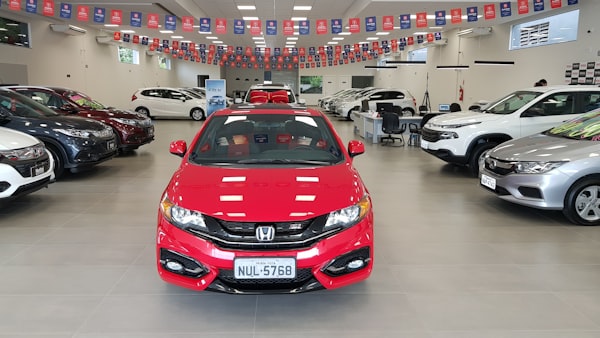
2017 Honda Civic EX
$7,900
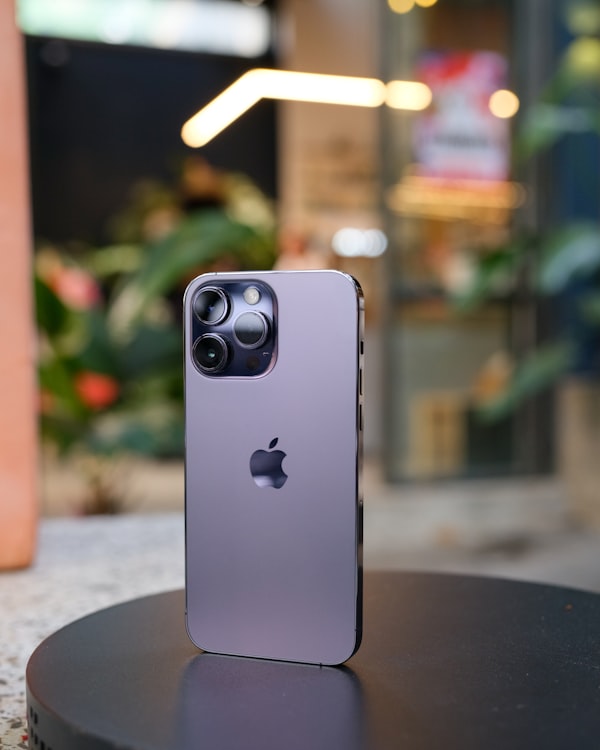
iPhone 13, unlocked
$480

Sony A7 III + 28–70mm
$1,150
Civic shell — parts only, no title
$1,200
You message first
The alert lands while the listing is minutes old. First message usually wins the deal — that's the whole game.
Hi! Is the Civic still available? I can come today.
Yes — you’re the first to ask.
Prefer a written walkthrough? How to set up Facebook Marketplace alerts · Facebook Marketplace alerts, explained
Smarter tools for sharper hunting
The details that separate a watch from a saved search.
Built for car flippers
Year ranges, mileage caps, title status and per-model price bands — the Civic listed 25% under market never slips past you.
One location, every marketplace
Pick your city once and every watch applies it across all five marketplaces — Facebook watches add a distance ring, 1 to 500 km.
Price bands per model & year
"2016–2018 under $9,000 · 2019–2021 under $13,000" — one watch, per-year caps, no overpriced noise.
Start from a winning template
221 ready-made searches with sensible price bands — iPad, MacBook, PS5, DeWalt and more — tuned for resale.
Five marketplaces, one app
The marketplaces JDMarket watches
App plans watch Facebook Marketplace worldwide, plus Craigslist, OfferUp, Kijiji, and Gumtree by country. In Australia & New Zealand, plans watch Facebook Marketplace today.
- Facebook MarketplaceWorldwide
- CraigslistUS
- OfferUpUS
- KijijiCanada
- GumtreeUK
Buy under market. Sell at market.
That's the whole trick — and it works on anything people undersell when they want it gone fast.
Chapter one — cars
Cars are the big league
The spread on one good car deal pays for years of JDMarket. Set per-model price caps, year and mileage limits, and let your watch run the stakeout.
Illustrative examples — every market is different.
Chapter two — everything else
Same play, smaller tickets
Consoles, phones, e-bikes, cameras, sofas — steady flips that stack up while you wait for the next car.
iPhone 13, unlocked
Sony A7 III + 28–70mm

West Elm sofa, like new

Air Jordan 1 Retro High
Illustrative examples — every market is different.
Free 3-day trial — set up in two minutes
Compare your monitoring options
Consider search count, geography, filtering and total subscription cost. See the sourced comparisons below for individual products.
| Capability | JDMarketJDMarket | Other alert tools | Manual & Facebook |
|---|---|---|---|
| Alert speed | 2 watches scheduled every minute; 8 every 5 minutes (Pro) | Varies by product and plan | Depends on when you check |
| Marketplaces covered | Facebook + Craigslist & OfferUp (US) / Kijiji (CA) / Gumtree (UK), app plans | Varies by product and plan | One tab per site |
| AI deal scoring (1–5) | Every listing, make/model gate | Varies by product and plan | None |
| Plain-language filters | Describe the deal in words | Varies by product and plan | Basic keywords |
| Per-model price bands | Many models, one watch | Varies by product and plan | No |
| No Facebook login | Yes — app plan | Varies by product and plan | Your own account |
| Runs with your computer off | Yes — all in the app | Varies by product and plan | No |
| Delivery | Telegram + phone push | Varies by product and plan | Facebook only |
| Starting price | From $30/mo | Varies by product and plan | No subscription cost |
Basic schedules 2 watches every 5 minutes and 8 every 10 minutes. Pro schedules 2 every minute and 8 every 5 minutes. Premium schedules all 10 every minute. These are check intervals, not delivery guarantees: marketplace visibility, filtering, processing, daily caps and notification delivery can add delay.
Comparing alert tools? Best Facebook Marketplace alert apps · JDMarket vs Swoopa · JDMarket vs CarSnipe · Is Swoopa worth it?
A watch, from search to saved
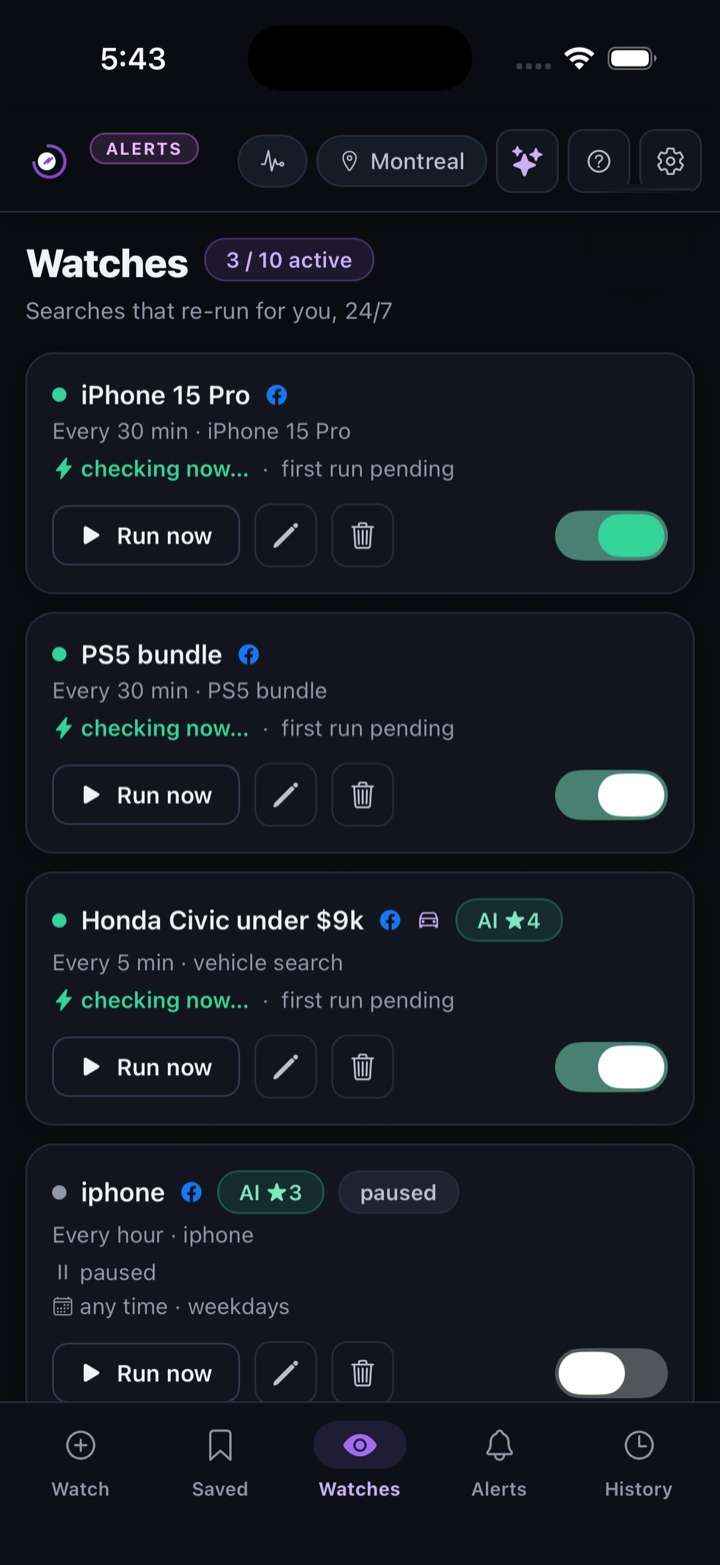
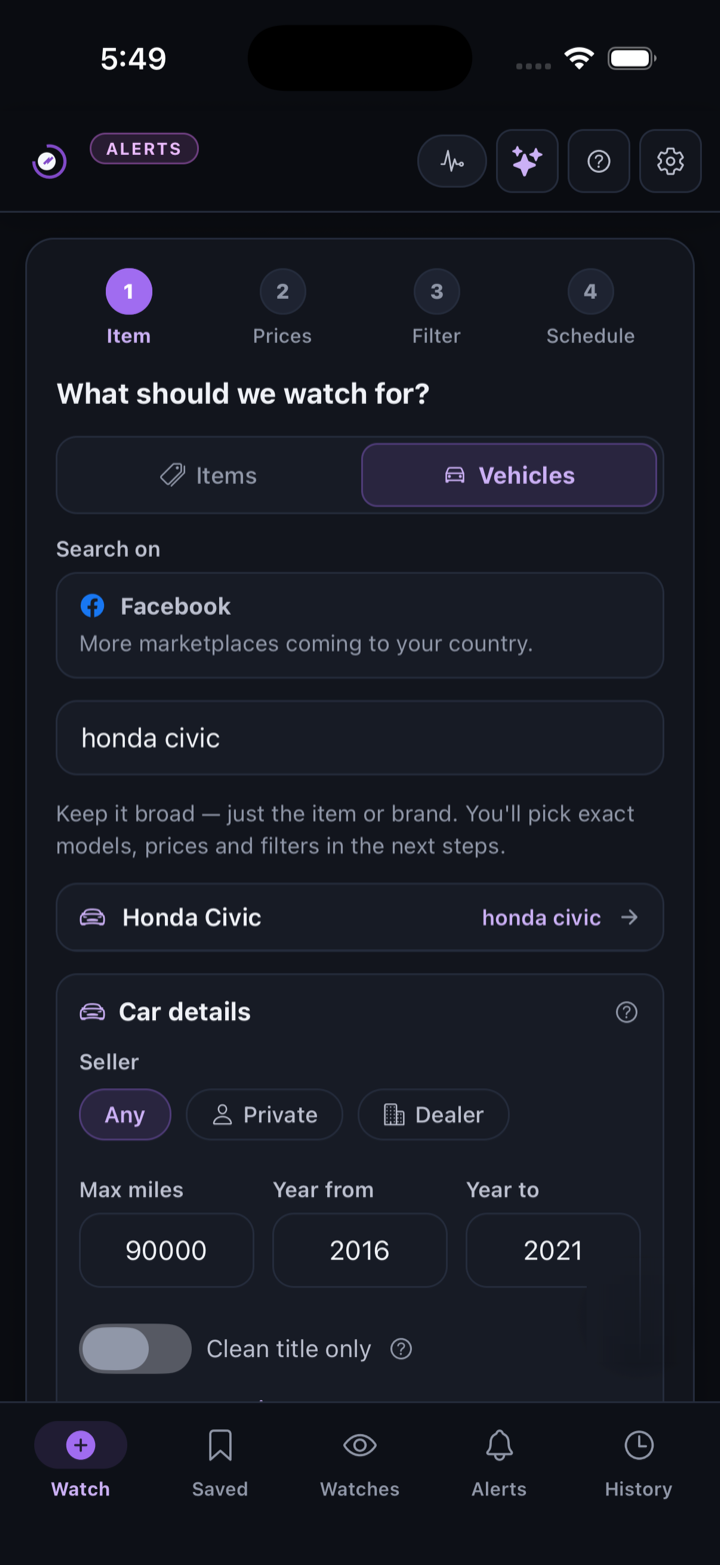
We created this example in JDMarket 1.5.1 on an iPhone simulator on September 10, 2026, using a dedicated test account. The saved watch searches Facebook Marketplace for an iPhone 13 near Austin, Texas, with a $300 budget and a five-minute check interval during active hours.
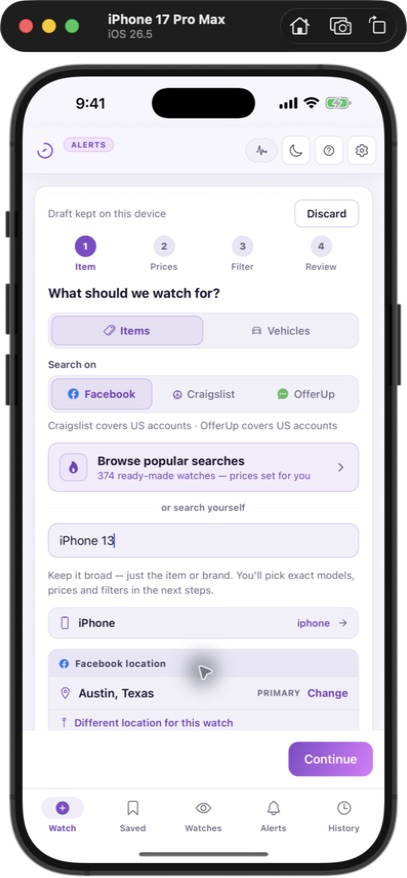
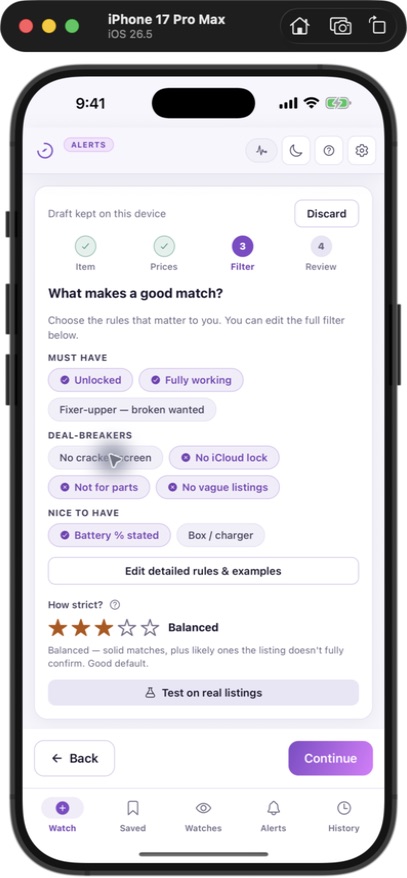
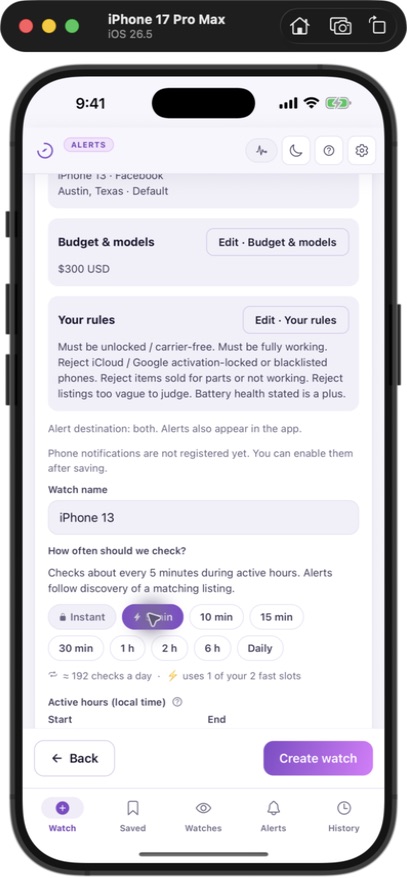
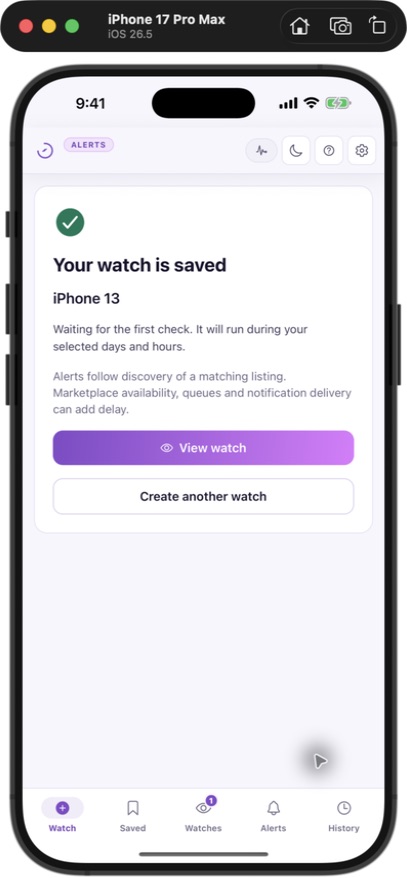
These are real setup screens with example criteria. They demonstrate watch creation, not customer results or measured notification speed. Phone notifications were not registered on this simulator; delivery must be enabled separately on your phone. Interfaces and available settings can change.
Read the setup guideYour accounts stay yours
JDMarket watches Marketplace from our own cloud — no Facebook login, nothing installed on your devices. Your credentials are never part of the picture, and billing is handled by Stripe, Apple or Google Play over secure connections.
You know where it runs
Everything runs in JDMarket's cloud for you — never hidden, nothing installed on your devices.
Your login stays yours
JDMarket needs no Facebook login at all — your credentials are never part of the picture.
Secure by default
Encrypted connections everywhere, and billing handled by Stripe, Apple or Google Play — we never see your card.
Answers to your questions
Everything you need to set up JDMarket and start getting alerts.
Which marketplaces does JDMarket watch?+
Every watch picks its marketplace: Facebook Marketplace everywhere JDMarket operates, plus Craigslist and OfferUp in the US, Kijiji in Canada, and Gumtree in the UK — all included on every app plan. Craigslist and OfferUp are US-only, Kijiji is Canada-only, and Gumtree is UK-only (not Australia), gated by your account country.
How fast are the Telegram alerts?+
Basic schedules 2 watches every 5 minutes and 8 every 10 minutes. Pro schedules 2 every minute and 8 every 5 minutes. Premium schedules all 10 every minute. These are check intervals, not delivery guarantees: marketplace visibility, filtering, processing, daily caps and notification delivery can add delay.
Do I need to build a special search?+
No. On the app plans you just type what you want — 'iPhone 13 under $500' — and add filters. You can also paste any Facebook Marketplace search URL you already use, on any plan.
Is there a free trial?+
Yes — the Basic plan ($30/mo) starts with a 3-day free trial: add your card through checkout, pay nothing for 3 days, and the subscription starts automatically on day 3 unless you cancel — cancel in time and your card is never charged. The Pro and Premium tiers are card-upfront with no trial.
Is my data private?+
Searches run on JDMarket's servers with no Facebook login at all — your account credentials are never part of the picture. Matches arrive on Telegram and phone push, and billing is handled by Stripe, Apple or Google Play.
Is there a mobile app?+
Yes — the iPhone and Android apps are both live (Australia, Canada, New Zealand, the UK and the US). Sign up on the web to start your free trial, then download from the App Store or Google Play to log in. Your matches also arrive on Telegram. Same account, same watches, same alerts.
Let JDMarket watch the market so you can buy first.
Create a Watch in two minutes — all in the app, with the searching done in the cloud. JDMarket searches while you do everything else.