Marketplace alert guide
Compare Facebook Marketplace alert apps
Compare JDMarket, Swoopa, DealScout and Flipify by the number of searches you need, your budget, region and filtering requirements. If you are looking for a Swoopa alternative, use the switching checklist below to carry over the details of your existing searches. For occasional use, a free option may be enough.
For one occasional search
For one occasional search, try the marketplace’s own saved-search controls or DealScout’s advertised free, hourly search. Confirm that it covers your device and region. A paid bundle adds little value if one slow search already solves the task.
For a small number of faster searches
Flipify lists a $5 Basic watchlist with ten-minute checks and a $10 Premium watchlist with one-minute checks. One Premium watchlist is $10 per month versus JDMarket Pro at $45 for a bundle with two one-minute slots. For just one fast search, Flipify has the lower listed subscription cost. This does not establish equal filtering or delivery performance.
For ten searches with configurable filters
For a larger list, calculate the whole workload. Two Flipify Premium and eight Basic watchlists total $60 per month; JDMarket Pro is $45 for 10 watches, with two one-minute and eight five-minute schedules. For ten one-minute schedules, JDMarket Premium is $80 versus $100 for ten Flipify Premium watchlists. These are configured/vendor schedules, not measured delivery times, and the products have different features and usage limits.
For additional sourcing features
Swoopa advertises broader sourcing features on its higher tiers. Compare the actual features you will use, capacity and billing commitments against your budget. We have not independently tested those features.
Our comparison method
Published by JDMarket, a product included here. Public competitor plans were rechecked on September 22, 2026. Our hands-on evidence covers JDMarket budget controls and saving a watch; competitor performance has not been tested side by side. Store offers, billing commitments and regional availability can differ. Create your account and subscribe in the JDMarket app. Prices, renewal terms and any available offers are shown by the App Store or Google Play before purchase.
Run a useful comparison
Use identical marketplace, location, item and price filters for at least several complete days. Log visible listings, useful matches, false matches, missed items and notification times. Compare total cost for the same number of searches. Keep observed results separate from advertised intervals.
Switching from Swoopa or another alert app
Write down each existing search before recreating it. A tool’s default radius or missing-detail behavior may differ even when the keyword is identical. Keep one important search in parallel during an evaluation period if your current access permits it. You do not need to move every watch at once.
- Record the marketplace, city, radius, currency, model/year limits and total price ceiling.
- Separate hard requirements from preferences. Record whether an omitted detail should exclude a listing.
- Recreate one search and check the saved settings, notification permission and active hours.
- Compare original listing links and useful matches over the same complete observation periods. Separate old inventory and test notifications from new listing alerts.
- Check cancellation and renewal dates in the service that bills you before ending the old subscription.
What our JDMarket setup check established
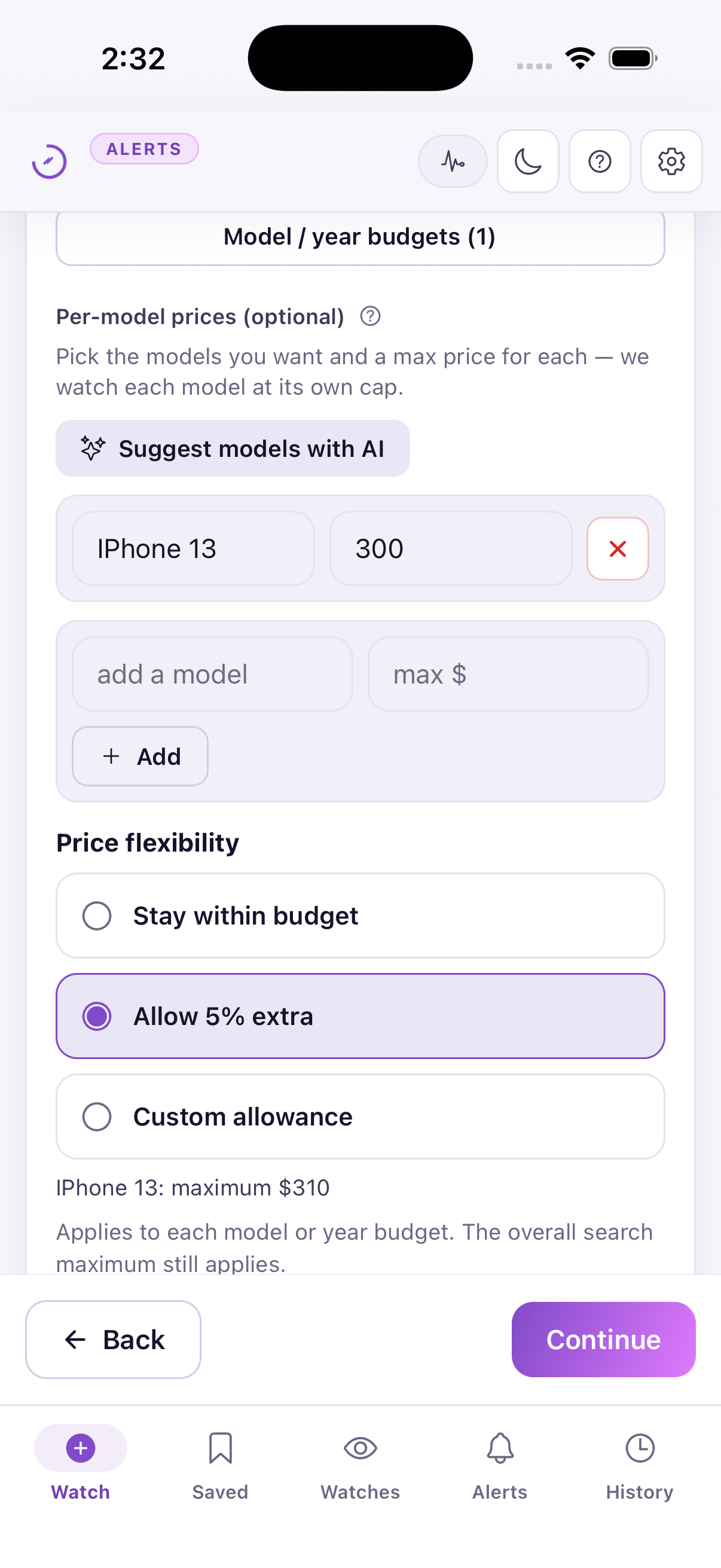
We verified three practical behaviors in the simulator: a 5% allowance raised a $300 model budget to $315, a lower $310 overall cap still limited that model, and the strict missing-details setting survived saving and reopening. The screenshots below document the check. Choose strict requirements if an omitted must-have detail should exclude a listing; allowing missing details means you may need to verify more with the seller. Neither mode confirms that seller statements are true.
| JDMarket | Swoopa | DealScout | Flipify | |
|---|---|---|---|---|
| Pricing basis | $30/month Basic for 10 watches | Monthly and committed plans; see linked pricing | Limited free plan; paid plans available | $5/month Basic or $10/month Premium per watchlist |
| Published timing | Basic: 2 × 5 minutes + 8 × 10 minutes; Pro: 2 × 1 minute + 8 × 5 minutes; Premium: 10 × 1 minute | Basic / fast / instant by plan; not independently measured | Free hourly; paid within 5 minutes (App Store description) | Basic every 10 minutes; Premium every minute |
| AI | 1–5 match scoring and plain-language rules | Advertises AI evaluation and scam filtering | No AI comparison verified in this review | Advertises AI-assisted filtering and pricing context |
Published by JDMarket, a product included here. Public competitor plans were rechecked on September 22, 2026. Our hands-on evidence covers JDMarket budget controls and saving a watch; competitor performance has not been tested side by side. Store offers, billing commitments and regional availability can differ. Create your account and subscribe in the JDMarket app. Prices, renewal terms and any available offers are shown by the App Store or Google Play before purchase.
| Workload | JDMarket monthly plan | Flipify monthly watchlists |
|---|---|---|
| One search, ten-minute checks acceptable | Basic $30 for up to 10 | $5 for one Basic watchlist |
| One one-minute schedule | Pro $45; includes two one-minute slots | $10 for one Premium watchlist |
| Two one-minute + eight other searches | Pro $45; remaining eight every five minutes | $60; remaining eight Basic watchlists every ten minutes |
| Ten one-minute schedules | Premium $80 | $100 for ten Premium watchlists |
Multiplication assumes no discount. Currency is USD before tax. Features, country support and usage limits differ. Check intervals do not guarantee notification arrival times. Create your account and subscribe in the JDMarket app. Prices, renewal terms and any available offers are shown by the App Store or Google Play before purchase.
Keep your own comparison log
Use the same marketplace, item, area, currency and required details in each tool. Record complete observation periods and every reference listing you check, including ones with no alert. Keep existing inventory and test notifications separate from new-listing alerts.
Use UTC timestamps with a timezone, such as 2026-09-22T14:05:00Z. Leave an unknown time blank. Your first observation is not the seller’s publication time; the difference between your observation and an alert is not proof of total delivery speed. Compare useful matches, missing alerts and false matches before drawing conclusions.
Download the blank comparison log (CSV)Opens in Excel, Numbers or Google Sheets. No sample results or measured performance are prefilled.
Sources & verification
- Swoopa — subscription options — Published monthly and committed plan prices, billing periods, trial and AI features. Vendor claims, not independently measured performance. (Verified 2026-09-22)
- Flipify — official site — Published per-watchlist prices, check schedules, trial conditions and AI-assisted filtering. (Verified 2026-09-22)
- DealScout — App Store — Developer description of the limited free plan, advertised alert intervals and setup time. No customer-rating comparison is claimed. (Verified 2026-09-22)